

A medical WordPress theme where doctors are records
Four complete healthcare websites ship with Canvas: a family clinic, a private practice, a dental studio and a therapy spa. Import one, put your own team and treatments in, and open. Scheduling stays with a plugin, and this page says exactly where that line falls.
Four healthcare websites, ready to import
Every one is a working site: its own pages, its own menus, the forms and the content types behind the listings. Preview them live before you buy.

Medical demo, live preview (opens in a new tab)
Health & Wellness · 9 pages
Doctors demo, live preview (opens in a new tab)
Health & Wellness · 6 pages
Dental Clinic demo, live preview (opens in a new tab)
Health & Wellness · 4 pages
Therapy & Beauty demo, live preview (opens in a new tab)
Health & Wellness · 14 pagesEvery doctor is a record, not a block of text
The Medical demo registers a Doctors content type and a Departments content type on import. A doctor is one entry: the photo, the specialty, the qualification, the years of experience, the languages spoken and a biography. A department is one entry too. Edit the record once and every listing follows.
- 9 doctors in the Medical demo, listed on three doctors pages that show the same records in a grid, a wider grid and a list with biographies
- Specialties are a taxonomy, so filing a doctor under Cardiologist puts them wherever cardiology is listed
- The Doctors demo files its team under 10 specialties and gives every doctor a profile page carrying the role, the qualifications, the experience and the languages spoken
- The Departments page opens each department in place, with its treatment list and its team

The form takes the request. A plugin takes the diary.
This is the question every clinic asks first, so here is the plain answer. Canvas has no appointment scheduler: no calendar of free slots, no double-booking check, no reminders, no deposits. What ships is a working request form, and what a scheduling plugin adds is the diary behind it.
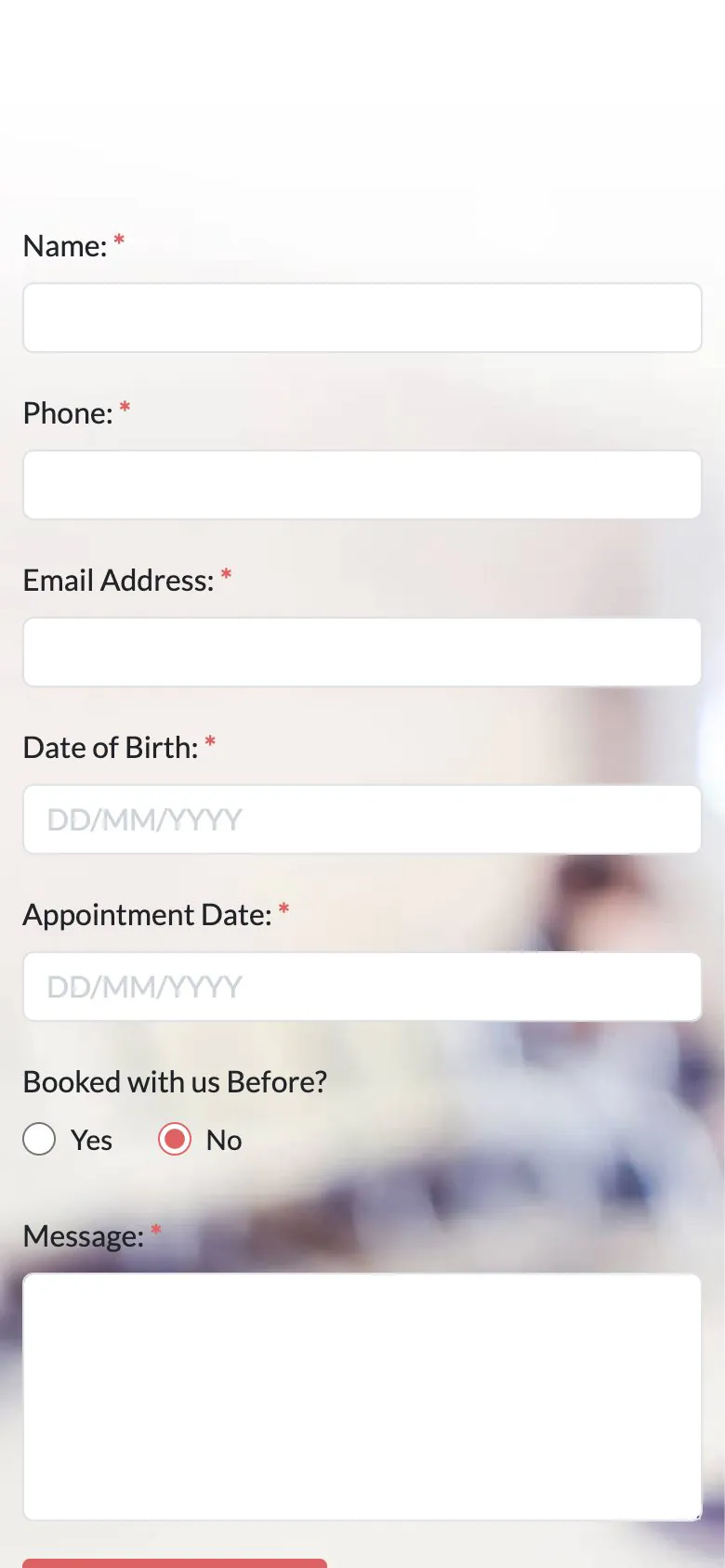
- The Medical demo's appointment page asks for name, phone, email, date of birth, a preferred appointment date, whether the patient has been before, and a message
- On submit it emails the practice, with a honeypot screening bots
- Any Canvas Form can also store the entry in WordPress, confirm to the patient, post to a webhook and add the address to Mailchimp, with reCAPTCHA v3 or Cloudflare Turnstile in place of the honeypot
- Medical ships 4 forms, Dental Clinic and Therapy & Beauty 2 each: an appointment request and a newsletter or enquiry form
A price you change in one place
Dental and therapy work is sold by the treatment, so the demos keep each treatment as a record with a page of its own. No table of rows to retype.
Dental treatments
The Dental Clinic demo ships 6 treatments. Each one has its own page with what is included, the price and its unit, and the rest of the menu underneath.
Therapy treatments
Therapy & Beauty carries 18 treatments in six categories, with a page each for the therapists, the workshops, the gallery and the journal.
Your team, twice over
Dental Clinic keeps its dentists and care team as their own content type with group pages, so a new hire takes one record and no rebuilt page.

Patients look up your clinic on a phone
Often at the worst possible moment, one-handed, on a bus. The doctor listings, the department details and the appointment form come off the same responsive blocks, so there is no separate mobile layout to maintain. The screenshot is the Medical demo as shipped, 390 pixels wide.
- The appointment button stays in the top bar at phone width, beside the language switcher
- Theme Options keeps phone rules for the header, the footer and the page title bar
- Images get width, height, lazy loading and responsive sizes from WordPress
- Canvas loads only the CSS and JavaScript a page actually renders
What a practice website has to have
The doctors list is populated
An import brings the inner pages, the menus, the forms and the content types, so the team page and the appointment form work the moment it finishes.
Edited in WordPress itself
A biography, a price, an opening hour: each one is a field in the editor WordPress ships. No page builder to learn, and none to renew.
Reversible
Canvas logs everything an import writes. Delete Demo Data clears it again, so looking at the dental demo after the clinic one costs you nothing.
Copy help included
Twelve staff biographies is a long afternoon. Canvas AI drafts and rewrites text in any block field, with monthly credits on every plan.
Clinic websites, asked plainly
Answers that hold for the four healthcare demos as shipped.
Is appointment scheduling included?
No, Canvas ships the appointment form, not a scheduler: there is no calendar of free slots, no double-booking check, no reminders and no deposits. The form collects the request and the practice replies. A scheduling plugin adds the calendar on top, and the demos are built so that swapping the form for a plugin's booking block is one block change on one page.
What happens when a patient submits the appointment form?
The Canvas Medical demo's appointment form emails the practice, with a honeypot field screening bots. A Canvas Form can also keep the entry in WordPress, send the patient a confirmation, post the submission to a webhook and add the address to Mailchimp, and spam can be handled by honeypot, reCAPTCHA v3 or Cloudflare Turnstile. Notification email leaves through your server by default, so set an SMTP provider in the Forms tab of Theme Options if your host is unreliable with mail.
Which medical demo should I start from?
Of the four Canvas medical demos, Medical is a family clinic: doctors, departments, an appointment page and a health news blog. Doctors is a smaller private practice built around 10 specialties and a team with profile pages. Dental Clinic is a four-page dental studio with priced treatments. Therapy & Beauty is the largest of the four: treatments, therapists, workshops, and a right-to-left stylesheet with them.
How are doctors and departments managed?
As records in the content types each Canvas demo registers on import, not as page layouts. A doctor is one entry: the photo, the specialty, the qualification, the years of experience, the languages spoken and a biography. A department is one entry too, with its summary, its location, the opening hours and a phone number. Edit the record once and every page that lists it follows.
Can patient data stay out of the site?
Yes, because storing entries in WordPress is a setting on each Canvas Form, so a practice that would rather keep nothing on the server can turn the database action off and leave the notification email on. Canvas has no CRM and no patient portal; what the form collects is what the site holds.
Can I change the colours, the photos and the wording?
All of it, in the block editor Canvas uses. Photos are ordinary media library images. Colour and type live in Theme Options, and every heading, every treatment price and every doctor biography is a field on a block or a record. Nothing here needs a page builder.
How many websites does one licence cover?
A Canvas licence on Starter costs $39 a year and covers 3 websites; Pro covers 10 and Agency 100. Every plan includes every demo and every block; the plans differ by seats, AI credits and the Agency plan's multisite activation.
Put your practice online with Canvas
One licence covers every demo and every block. Import the medical demo from the setup wizard, put your own team and departments in, and add a scheduling plugin when you need the diary.