

Write website copy with AI in WordPress
The blank page is the slowest part of building a website. Canvas AI lives inside the block editor and writes into the field you are already editing, which makes it useful for drafts and dangerous for anything you do not read afterwards. This guide covers both halves.
Step 1: Fill in the site context first
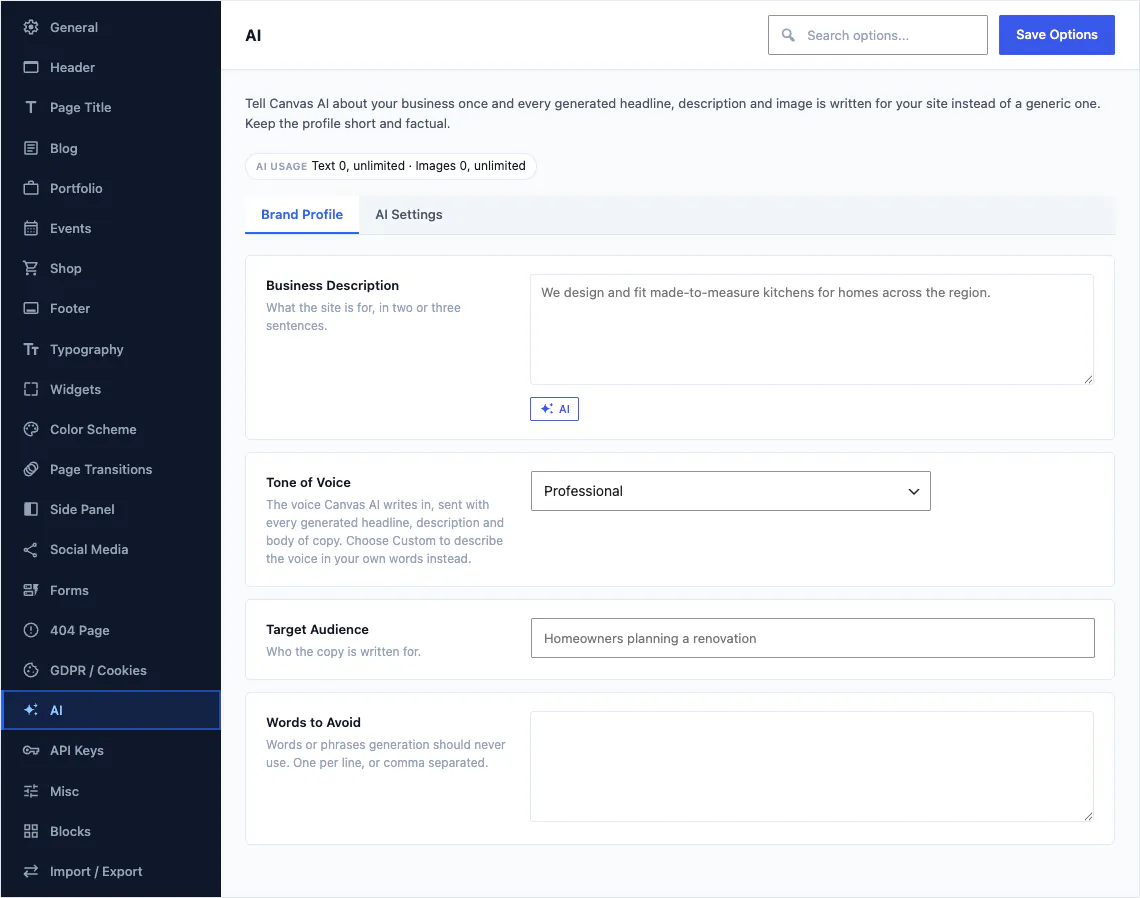
Do this before you generate a single sentence. Theme Options has an AI panel, and what you put there travels with every request from every page, which is the difference between copy that sounds like your business and copy that sounds like every business.
The four fields
- Business description. What you do, who you do it for, and the things a new writer would need to know on their first morning. Be specific: the city, the speciality, the price bracket, the thing your competitors cannot say.
- Tone. Choose one of the presets, or choose the custom option and describe the voice in your own words. Custom is worth the two minutes it takes.
- Audience. Who is reading. This moves the reading level and the emphasis more than any other single field.
- Words to avoid. The phrases you never want to see. Competitor names, the industry cliches you are tired of, and the words your brand guidelines already ban.
The block you are editing and the page it sits on are added automatically, so a product description and a contact page do not come back sounding the same.
Step 2: Generate a first draft
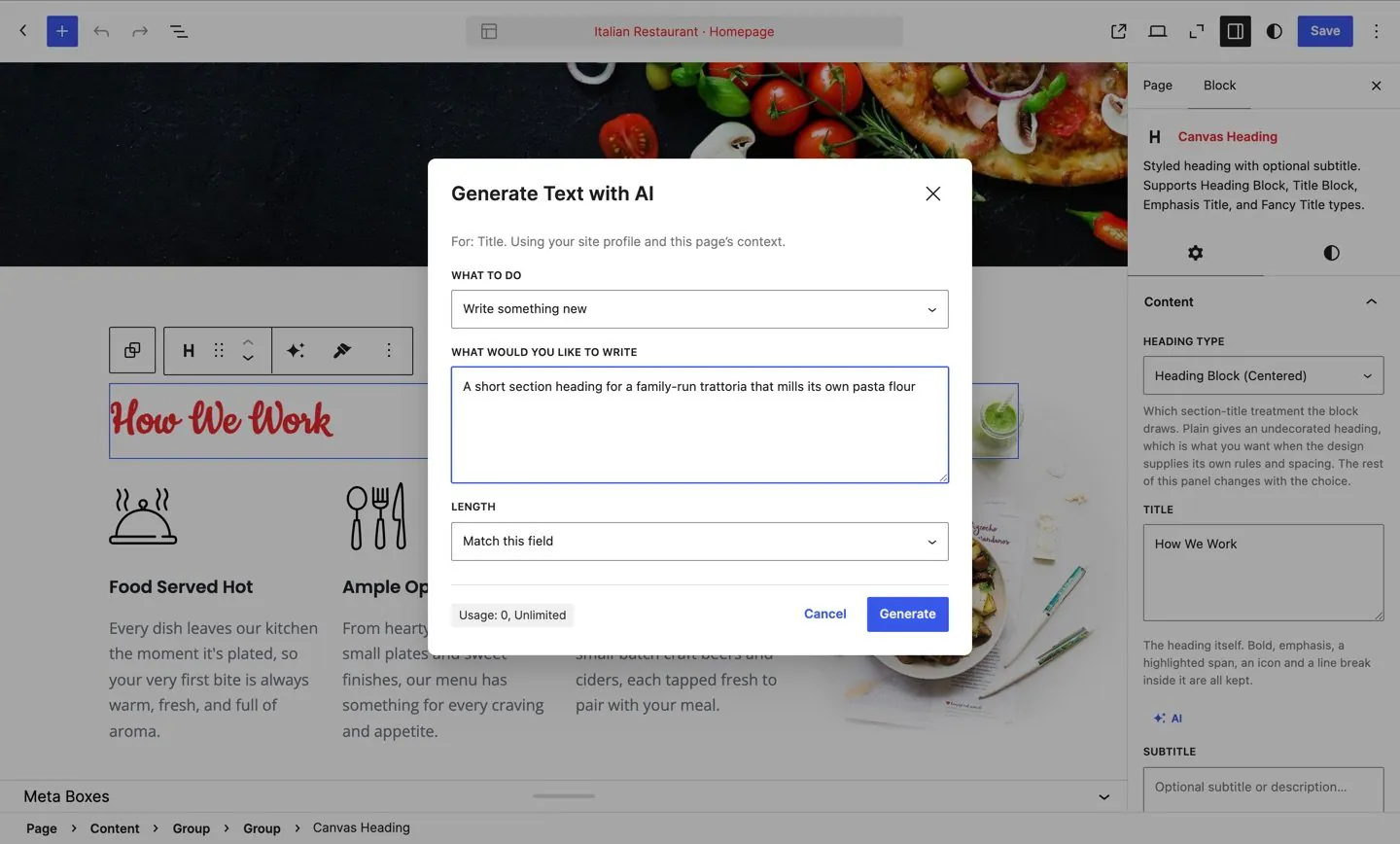
Select a block and the toolbar offers Generate text, in the same row as the formatting controls. Describe what you want, choose a length that matches the field, and the suggestion appears next to your prompt.
Write a prompt worth answering
The quality of what comes back tracks the specificity of what you ask for. Compare "write an about section" with "write two short paragraphs about a family bakery that has been on the same street since 1974, aimed at people choosing a birthday cake, mentioning that everything is baked overnight". The second one produces something you can edit. The first produces something you delete.
Nothing changes until you choose
The result sits in the dialog with four options: insert it, replace the field, copy it, or regenerate and try again. Your content is untouched until you press one of them, so there is no cost to asking twice.
Ask for less than you think you need. A two sentence answer you tighten is more useful than a page of prose you have to cut, and it costs the same one generation either way.
Step 3: Improve what you wrote yourself
The better use of a writing tool is not the first draft, it is the second. You know what you want to say; you are stuck on how to say it in forty words.
Enhance a whole block
Select the block and choose Enhance text from the toolbar. Hand it your own rough version and ask for a shorter, clearer or warmer one. Because your business description and tone travel with the request, the rewrite comes back in your voice, not in generic marketing language.
Enhance a phrase
Select a few words inside a paragraph and Enhance with Canvas AI sits in the formatting menu, beside footnotes and highlights. Use it on the one sentence that is not working, and leave the paragraph around it alone.
Code mode, for CSS
Switch a request to code and describe the rule you want. The answer goes into the block's custom CSS field, well away from your content. Useful on the days when you know the effect you are after and cannot remember which property produces it.
Step 4: Work field by field in the settings panel
Most page copy is not one long article. It is dozens of short fields: a subtitle here, a card title there, a button label, an image caption. Those fields carry their own AI button in the block settings panel.
That matters more than it sounds. Writing a card grid means writing six titles that have to be the same shape and the same length, and doing that one field at a time, in place, with the other five visible, produces a set that reads as a set. Generating them in a separate window and pasting them in does not.
A practical order for a page
- Write the headline yourself. It is the one sentence worth your full attention.
- Draft the supporting paragraph with a prompt, then cut it by a third.
- Fill the repeated fields, such as card titles and descriptions, one field at a time.
- Enhance the two or three sentences you are unhappy with.
- Read the whole page aloud. Anything you would not say out loud, rewrite.
Step 5: Generate images at the size the block needs
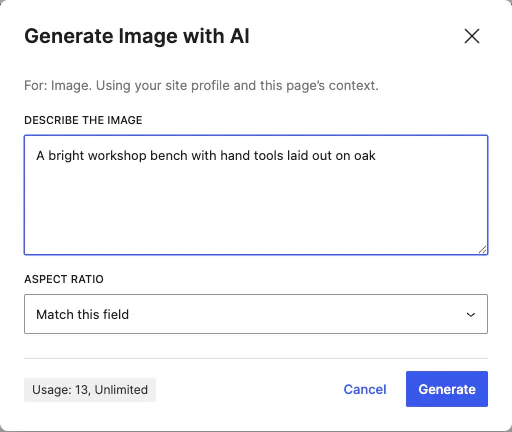
Describe the picture and Canvas generates it at the shape the block expects, so a hero and a thumbnail each come out correctly proportioned, with no cropping afterwards.
- The aspect ratio starts from the block. Change it if you want something else, or switch to a custom size and type the width and height you need within the range the dialog shows.
- Results go into your media library as PNG, JPEG or WebP, and behave like any other attachment afterwards: reusable on other pages, editable in WordPress, included in your backups.
- Generate with AI is a third tab beside Upload files and Media Library, so you can create an image anywhere WordPress asks for one.
- Set a default aspect in Theme Options so everyone on a team gets consistent shapes without stopping to think about ratios.
Where a generated image belongs, and where it does not
Backgrounds, textures, abstract section art and placeholder illustrations while a page is being built: fine. Your team, your premises, your food and your products: photograph them. A restaurant page decorated with a plate nobody in that kitchen has ever cooked is the fastest way to lose a booking, and a generated picture of a person you do not employ is a promise you cannot keep.
Step 6: Credits, and what they cost
AI is part of the licence you bought. There is no second subscription, no wallet to top up and no per-generation invoice.
Two pools, refilled monthly
Text and images have separate allowances, so a heavy writing week never eats the budget for pictures. Starter includes 200 text and 30 image generations a month, Pro includes 1,000 and 150, and Agency includes 2,500 and 500. Both pools reset at the start of each month on every plan.
Knowing where you are
A usage chip sits in the dialog footer, next to the button that spends the credit, so the balance is in front of you at the moment it matters. When a pool runs out the dialog says which one, when it resets and where to upgrade, and nothing else in the editor changes: you carry on writing and building by hand.
Spending them well
- Write the prompt properly the first time. Three vague attempts cost three credits; one specific request costs one.
- Reach for Enhance on a phrase before you regenerate a whole block.
- Draft the repeated fields in one sitting while the page is fresh in your head.
- Generate images for the sections that genuinely need art, and photograph the rest.

Step 7: Who is allowed to use it
Three settings in the same Theme Options panel, aimed at teams and at sites you hand to somebody else.
- A minimum role. Set the lowest role allowed to send an AI request. Keep it to administrators or editors and everyone else edits as normal, with the buttons absent for them, never disabled and taunting.
- Hide the credit counter. The usage chip can be switched off, which is what most agencies do before handing over a finished website.
- A default image aspect, so a team producing images across a site produces consistent ones.
What leaves your website
Your prompt, the block and page you are editing, and the site context from Theme Options travel to the Canvas API with your licence, which is what entitles the request and meters it against your pools. Your website never talks to a model vendor directly, so there is no key to buy, no key to rotate and no key to leak.
Step 8: What to keep human
Generated text is a good first draft and a poor final one. Some things on a website should never be produced by a machine, and a few of them are legal.
- Anything factual. Prices, opening hours, delivery times, ingredients, qualifications, guarantees and dates. Check every one against reality before publishing.
- Anything legal. Terms, refund policies, privacy notices and accessibility statements are commitments you are making, not copy.
- Claims about people. Team biographies, testimonials and case studies must come from the people they describe. An invented testimonial is fraud in most jurisdictions and obvious to readers in all of them.
- The one sentence that says what you are. If everything on your home page could appear on a competitor's home page, the tool has not failed, the brief has.
A workable rule
Use it for the shape of a page, for second drafts, for the fourteenth card title of the afternoon and for the sentence that will not come out right. Write the promise, the price and the truth yourself. Then read the whole page aloud one last time, because the sentences that survive that test are the ones a customer will believe.
Where to go from here
Two guides where the writing is the slow part, and the feature itself.
Common questions
The full FAQ answers the rest, and the documentation covers every setting in detail.
Do I need my own API key?
No. The editor sends your request to the Canvas API, which returns the result. There is nothing to sign up for separately, no key to paste into WordPress and no key sitting in your database waiting to be found.
How many generations do I get?
Every plan includes a monthly allowance in two separate pools, one for text and one for images. Starter includes 200 text and 30 image generations a month, Pro 1,000 and 150, and Agency 2,500 and 500. The balance is shown in the editor while you work, and both pools reset each month.
Who owns the text and images it produces?
You do, and you are also responsible for them. Generated images land in your media library as ordinary attachments and behave like any other upload afterwards. Check any claim, price, statistic or legal statement before you publish it, the same as you would check a draft written by a new colleague.
Does AI still work when my licence expires?
No. AI pauses on expiry alongside updates and new demo imports. Your website carries on rendering everything it holds today, including the text and images AI produced for it, and renewing switches AI back on.
Build your next website with Canvas
Beginner, freelancer or agency, you get the same blocks, the same demos and the same support. Start with one site and add more when you need them.